 |
|
Sept 4-7 Labor Day (No School)
Sept 8 PTA Meeting @ 6:00 PM
Sept 21 No School
|
Dear Washington Mill Families,
Thank you for joining us for Back-to-School Night! It was wonderful to see so many families in attendance and to have the opportunity to share information about the exciting year ahead. Your partnership and support play an important role in the success of our students and school community.
We would also like to thank you for helping make the first two weeks of school such a positive and successful start. Our students have been learning routines, building relationships, and demonstrating what it means to be kind, respectful, honest, and collaborative as part of our Wolf Pack Way. We are so proud of their efforts and grateful for the support you provide at home.
As we head into the long holiday weekend, we hope your family have time to relax, recharge, and enjoy time together. We look forward to welcoming everyone back refreshed and ready for another great week of learning.
Thank you for being such an important part of our Washington Mill community.
Have a wonderful holiday weekend!
Brad Bennink
Principal
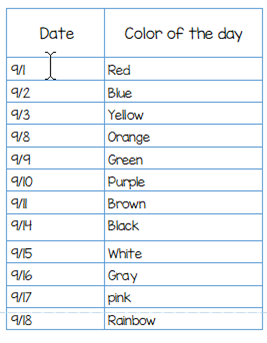
Kindergarten students are currently reviewing colors, and we’re making it extra fun by celebrating with a Color-of-the-Day Review! Each day, we will focus on a different color through engaging activities, songs, books, games, and hands-on learning experiences. To join in the fun, students and staff are invited to wear something that matches the color of the day if they already have it. Please do not feel the need to purchase anything special—participation is completely optional, and we want everyone to use items they already own.
This exciting review helps reinforce color recognition while encouraging creativity, participation, and collaboration with classmates. We look forward to a colorful week of learning as our youngest Wolves continue to build their foundational skills and confidence!
Everything You Need to Do in SIS ParentVUE
Are you working your way through back-to-school forms and checklists? Make sure you have a SIS ParentVUE account for your family and log in to find important forms and updates.
- Be among the first to know about weather closings, bus delays, and other critical communications from your school and FCPS by providing your cell phone number and email in ParentVUE. To update your contact information in ParentVUE, click the “Online Packets” tab in the upper right of the screen, then click the “Online Verification/Update” icon.
- Submit daylong absences by clicking “Report Absence.”
If you do not have a ParentVUE account, contact your child’s school for an activation code and follow the directions on the SIS ParentVUE Account webpage.
Remember to Complete Permission Forms for School Resources
Families can now easily grant consent for their children to access a variety of school resources through the Parent Digital Consent system. This online tool can be accessed using your SIS ParentVUE account login. Parents can easily opt their child in or out of a variety of resources, including online educational tools, school counseling services, and more.
Visit the Parent Digital Consent webpage to access the system. Watch this video to see how to use the tool.
Opt In or Out to Student Devices Being Sent Home for Grades 1-6
New this year, families can opt out of having student laptops sent home with their student.
- If you do not want your student to bring their FCPS-issued device home, please toggle the Opt Out button to a check mark and confirm by pressing Save Selection.
- If you would like your student to bring their FCPS device home, no toggle action is needed. Confirm by pressing Save Selection.
Students whose families opt out will continue to have access to an FCPS-issued device during the school day. Please reach out to your student’s teacher to understand expectations for homework and any learning activities that may require access to technology outside of the school day.
Thank you for your patience as we all get used to new routines this school year. We appreciate our families following Kiss and Ride procedures and being patient while waiting for your child’s bus.
If your child’s bus is delayed, you may access the Bus Delay Notification System or use the Here Comes the Bus mobile app to receive the delayed bus report. Email messages will be sent to announce significant bus delays. Please contact the Transportation Office at 703-446-2150 with any additional questions. For concerns after 5:30 p.m., contact the FCPS Office of Safety and Security at 571-423-2000.
Update your contact information in SIS ParentVUE to make sure you receive email messages about bus delays.
 |
|
Stay connected with the Washington Mill PTA
Our Linktree page (https://linktr.ee/washmillpta) is your one-stop hub for everything happening in our PTA community! From volunteer opportunities to upcoming events and important resources, it’s updated regularly—so check back often as new ways to get involved are always being added.
Don’t miss out—be sure to sign up to receive the PTA newsletter for the latest updates, reminders, and ways to support our amazing Wolf community!
|
In case you missed it in FCPS This Week, the school division shared updates on the following topics:
-
- Everything You Need to Do in SIS ParentVUE
- Permission Forms for School Resources
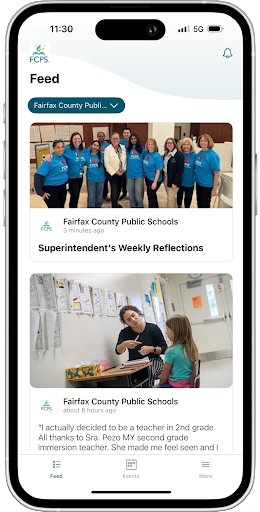
- Follow Multiple Schools in the App
Read FCPS This Week to learn more about these topics. If you are not already receiving this weekly newsletter, please sign up today.
QUICK LINKS
|